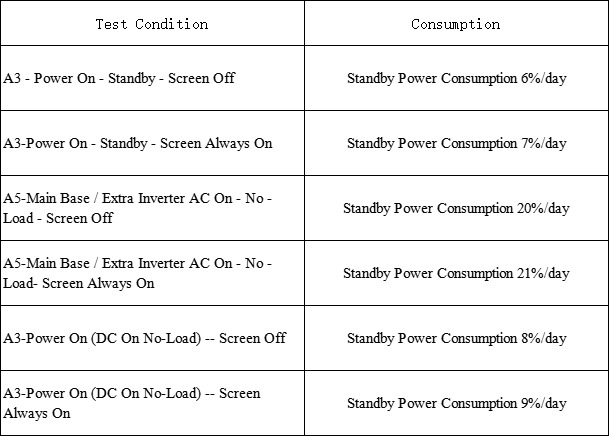
Expected power loss during storage, in various modesUpdated a month ago
Normal power fluctuations while plugged in
It is normal for the power station to show a drop from 100% to 95% or so, even when plugged into a wall outlet. The station is programmed to maintain its charge in this range.
Significant loss of power when not in use
When customers report that their Sorein Power Station has lost a significant amount of power while turned off, most of the time we find that the unit wasn't really off.
The indication that the unit is ON is the green light in the center of the power button. The green light will be illuminated whenever the unit is powered. When the Sorein Main Unit is left ON with nothing connected to it (with the inverter OFF) it will consume about 190 Wh per day. That's about 40% of a 3.2 kWh Sorein battery stack in a week.
Briefly pressing the power button on the front panel will cause the display to go blank, but it doesn't turn off the power station. You'll notice that the green light stays on.
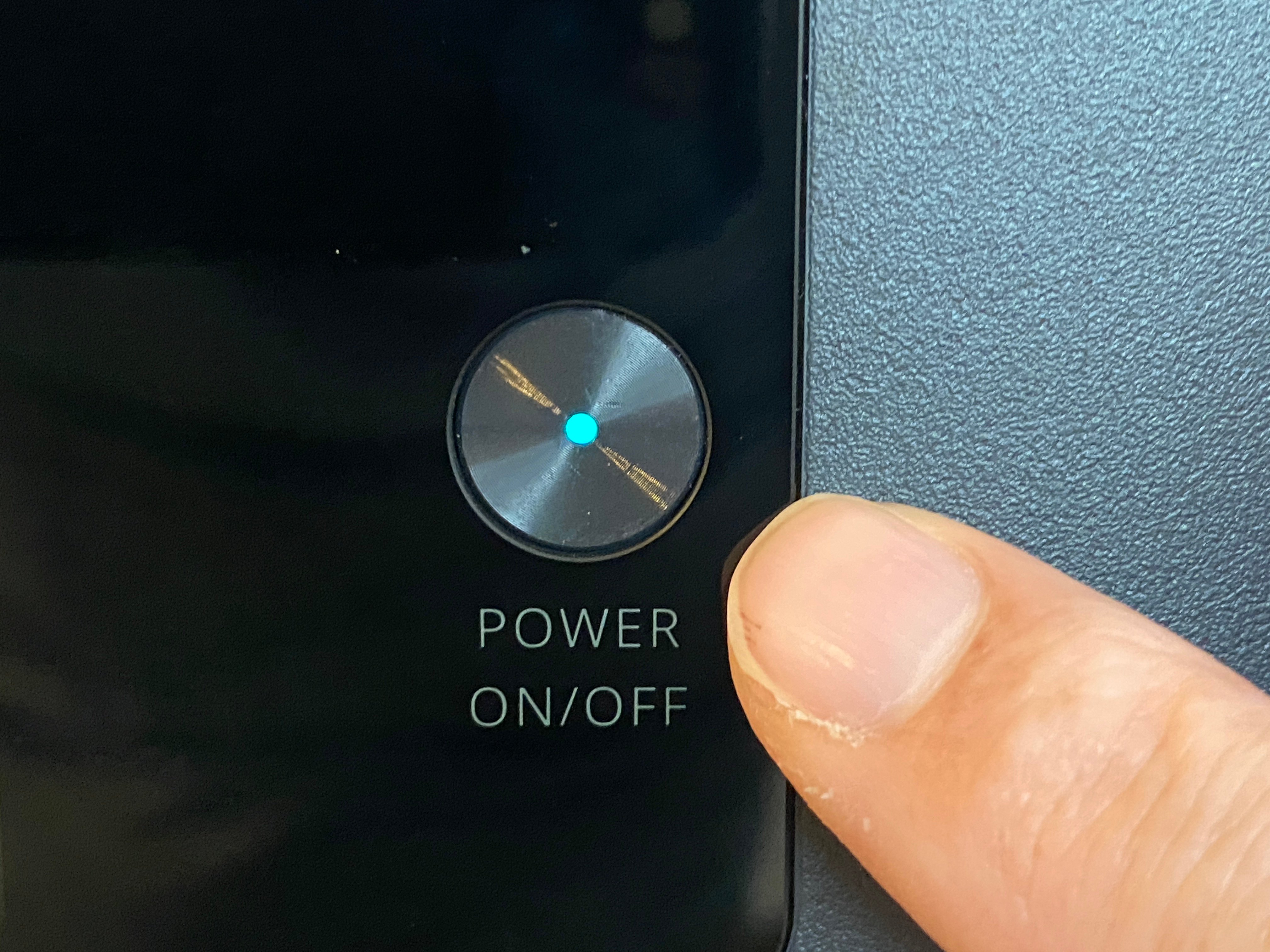
Turn the power station OFF by pressing and holding the front panel power button until the screen shows "OFF" and then goes blank. The green light in the center of the power button should no longer be illuminated. I
In OFF mode, the Sorein Power Station will consume very little power. You can leave it in this mode for weeks without losing a significant amount of power.
Turn off the power station when not in use
The Sorein Power Station should be completely OFF when you aren't using it. Otherwise it will continue to use up its battery, even if there's nothing plugged into it.
When turned fully OFF, the Sorein battery will still gradually lose a small amount of power, but it will be much less. It should not be enough to make a difference during a typical trip.
During storage
We suggest you either:
- Keep the Sorein Power Station plugged in, OR
- Put the Sorein Power Station in "Warehouse Mode". See this Help Center article for information about Warehouse Mode.
Turn off the AC inverter when not needed
The inverter (which powers the AC power outlets) consumes power anytime it is turned ON, even when nothing is plugged into it. The inverter consumes about 640 Wh per day by itself. This is about 20% daily of a 3.2 kWh stack (the Main Unit + 1 Extra Battery).
You should only have the inverter ON when you need power from the AC outlets. Otherwise, turn it off to save energy.
To turn the inverter OFF, press the inverter's power button (on the back of the Main Unit/Control Unit, next to the AC power outlets) for two seconds. You will hear a beep and the green light in the center of the button will go off. (See photo above.)
Note that turning the inverter off does not turn off the entire Sorein Power Station. You can use other outputs on the Sorein Power Station while the inverter is off, including the 12-volt DC outlets (DC5521 and Car Charger outlet),and the USB-A and USB-C outlets.
Reference chart: Inverter stand-by power consumption
This data is for reference only. It is based on test results under normal temperature and atmospheric pressure. The actual values may vary slightly depending on local operating temperatures and the duration of user operation.