
AIRLoq quick reference guideUpdated a month ago
Change Master code
Press: # 2 # 1111 # New Code # New Code #
Volume Adjustment
661# Silent
662# Low volume
663# Medium volume
664# High volume
Note: The default setting is High volume.
Add Entry Code
# 1 # Master Code # New Code # New Code #
You can have up to 10 user codes, plus the Master Code. Entry codes must be 4 digits.
Change an Entry Code
# 2 # Master Code # New Code # New Code #
Delete All User Entry Codes
# 3 # Master Code #
All codes other than the Master Code will be deleted.
Notes for all functions
• Entry codes must be 4 digits.
• If the wrong code is entered, you will hear four quick beeps and the keypad will flash red/blue.
• You can press * if you’ve entered a wrong number. This will erase the number entry and allow you to key in the correct number, without having to start over.
Reset to Factory Settings
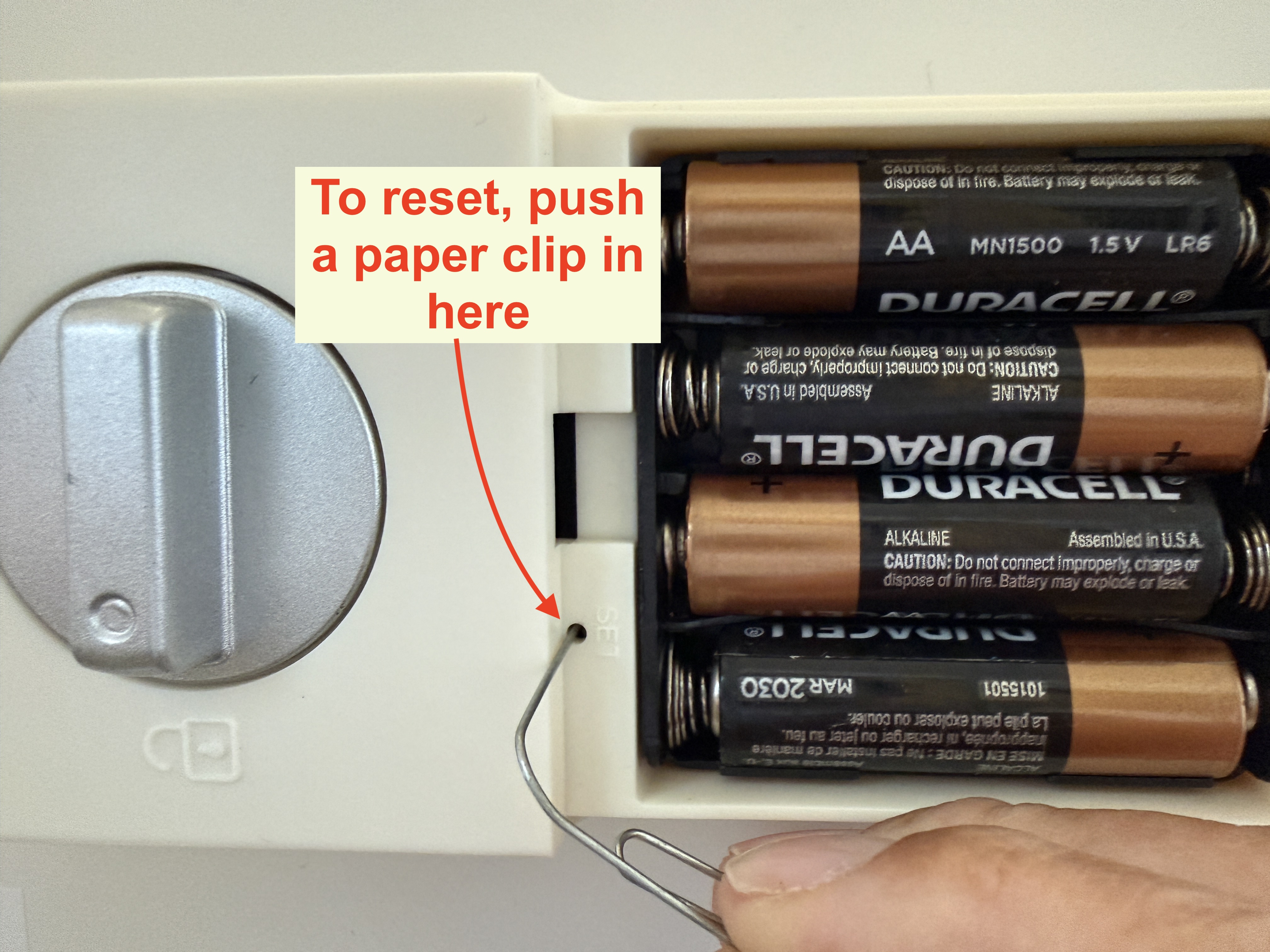
Open the battery cover. Push a pin or the end of a paper clip in the small hole to touch the reset button. Hold the button until the lock beeps. All user entry codes will be deleted, the Master Code will be reset to 1111, and volume will reset to High.